Coming soon · October 2026
For Claude Code, Codex & long builds
Close the lid.
Your agent keeps working.
Your Mac sleeps when it’s done.
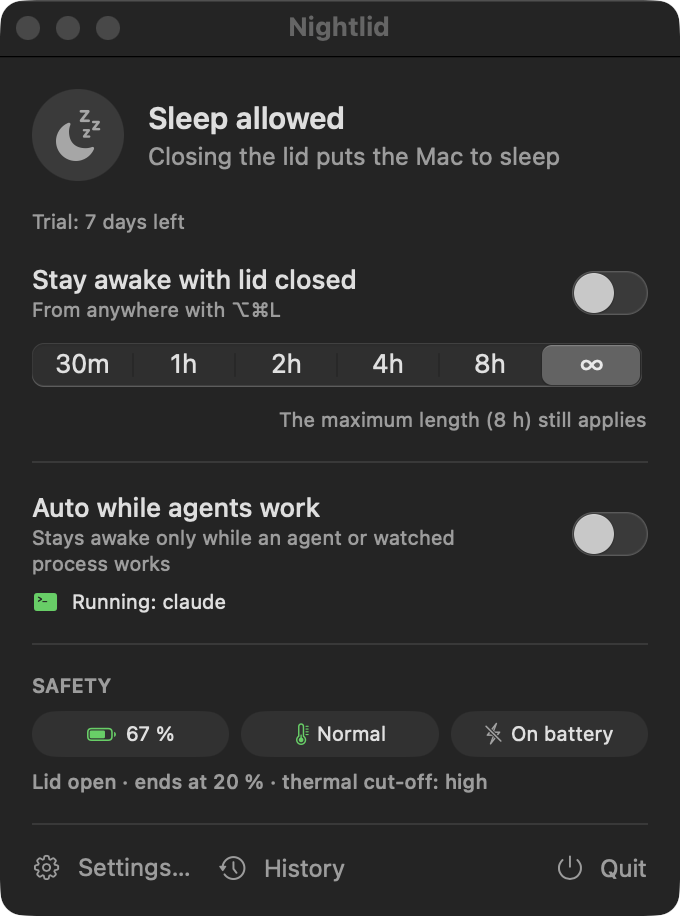
Nightlid keeps your MacBook running with the lid closed — on battery, without an external display — exactly as long as your agent or build is busy. Then it puts the Mac to sleep. With a battery floor, a thermal cut-off and a crash-safe design, so it never runs your battery flat in a bag.
How it works
Awake while there’s work. Asleep the moment it’s done.
macOS puts a MacBook to sleep when you close the lid unless a display and power are connected. Nightlid lifts that, safely, for exactly as long as you need.
-
1
Start your agent
Run Claude Code, Codex or a build, and switch on Auto — or toggle with ⌥⌘L, a timer or the CLI.
-
2
Close the lid
The Mac keeps running on battery, no display needed. Throw it in your bag’s outer pocket or leave it on the desk.
-
3
The agent finishes
Its hook tells Nightlid the turn is over. After a short grace period — in case it starts again — Nightlid lets go.
-
4
Your Mac sleeps
Nightlid actively puts the closed Mac to sleep — turning the setting off alone wouldn’t. Your battery stays put until morning.
Features
Small app. Every detail thought through.
Lid closed, on battery
No external display, keyboard or charger required. The menu-bar icon shows the state at a glance, with the time left for timed sessions.
Auto mode for agents
Stays awake only while Claude Code or Codex is actually working — not while it idles at a prompt — or while a watched process like a build or Docker runs.
Battery floor
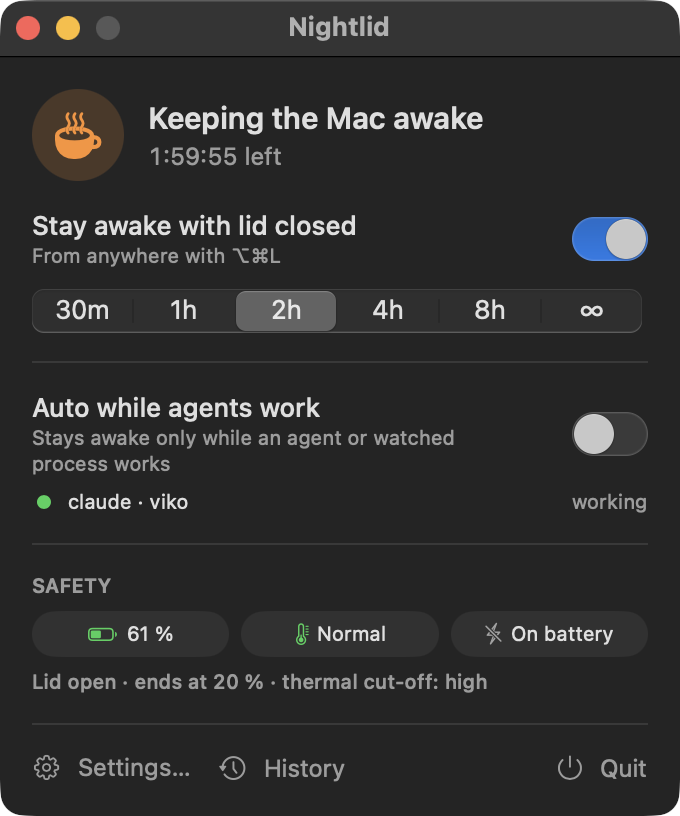
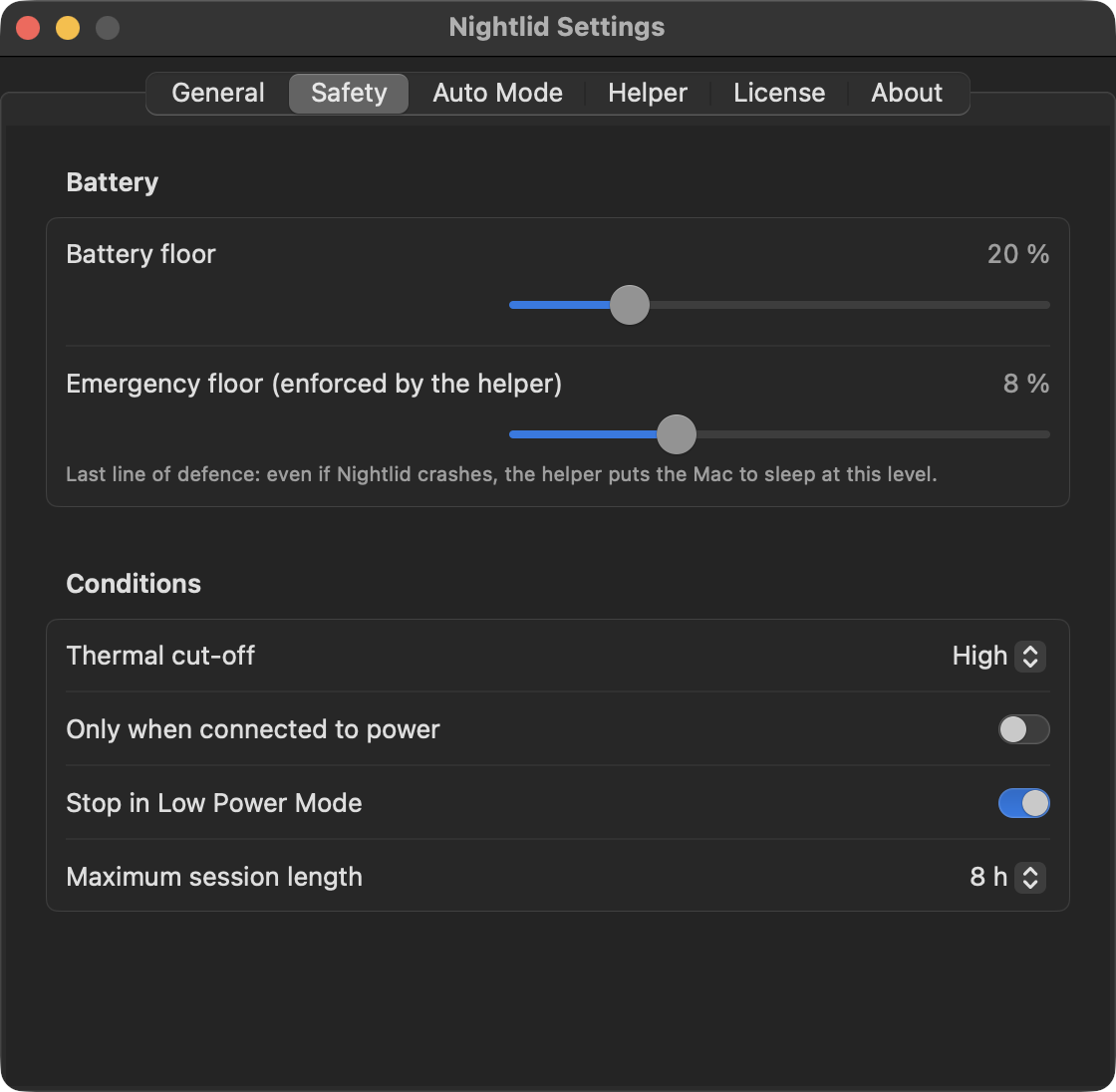
Ends the session and puts the Mac to sleep at your floor (20 % by default). A separate emergency floor is enforced by the system helper even if the app is gone.
Thermal cut-off
Stops when macOS reports the Mac is running hot. You choose the level; the helper has a hard stop at “critical”.
Crash-safe
The app checks in every 30 seconds. If it crashes or is killed, normal sleep returns within about 90 seconds — no forgotten pmset setting.
Timers & hotkey
30 min, 1, 2, 4, 8 hours or until you stop it — with a maximum length (8 h by default) as a backstop. Toggle anywhere with ⌥⌘L.
Command line
nightlid run -- make release keeps the Mac awake exactly while a command runs, with the same safety rules. Plus on, off, status --json.
Your rules
Only on the charger, stop in Low Power Mode, custom watched processes, grace period. Sensible defaults, nothing to configure on day one.
Automation without surprises
nightlid:// URLs for Raycast, Alfred, Shortcuts and scripts. A link opened from a web page asks first; every outside start is announced.
History
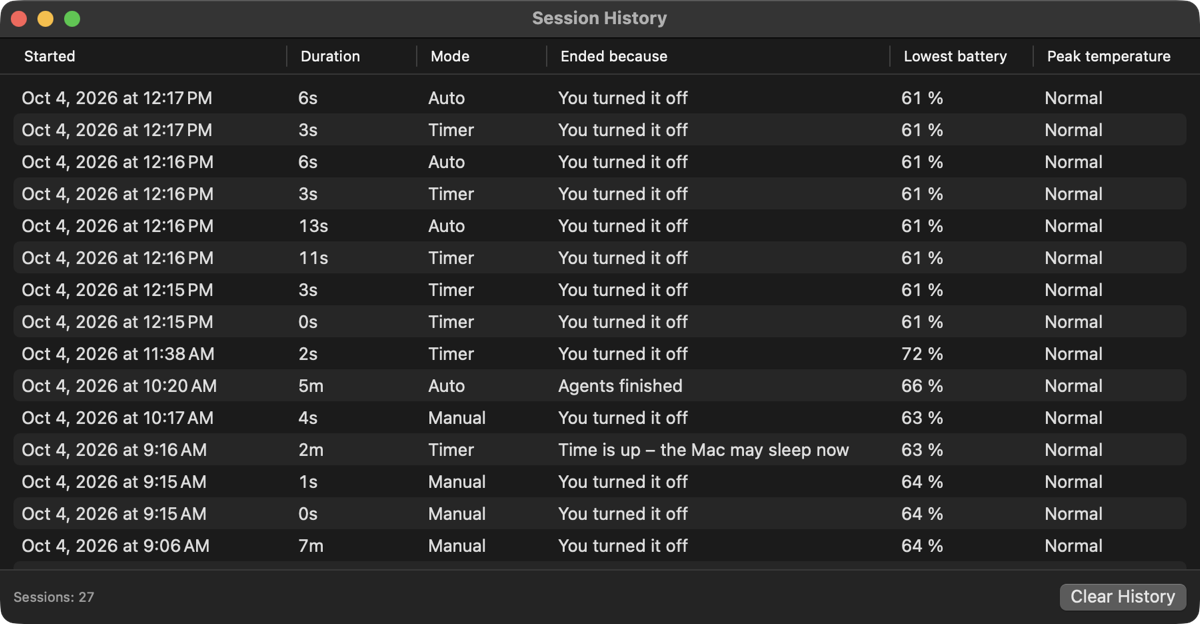
Every session with its length, lowest battery, peak temperature and the reason it ended — “battery reached 20 %”, “agent finished”, “timer elapsed”.
Notifications
Know when a session ends for safety and why. Warnings before the battery floor or the timer is reached.
English & Czech
A native macOS menu-bar app in SwiftUI. Launch at login, light and dark mode, universal binary.
Safety
Built so it can’t cook your Mac or drain your battery.
The one-liner sudo pmset -a disablesleep 1 works — until you forget to undo it, the battery hits zero in your bag, or you learn that turning it back off doesn’t sleep a Mac whose lid is already closed. Nightlid wraps that setting in layers of safety.
- Leases, not switches. The helper keeps sleep disabled only while the app renews a 90-second lease. No renewal, no awake Mac.
- Active sleep. When a session ends with the lid closed, Nightlid puts the Mac to sleep — and retries if it didn’t take.
- Two battery floors. Your floor in the app (default 20 %) and an emergency floor in the helper (default 8 %) that works even if the app has crashed.
- Heat aware. Thermal cut-off in the app, hard stop at critical in the helper.
- Hard caps. A maximum session length (default 8 h) and an absolute 24-hour limit per lease.
- Clean restart and shutdown. Log out, restart or shut down normally — Nightlid gets out of the way.
Agents
Knows when your agent is working — not just running.
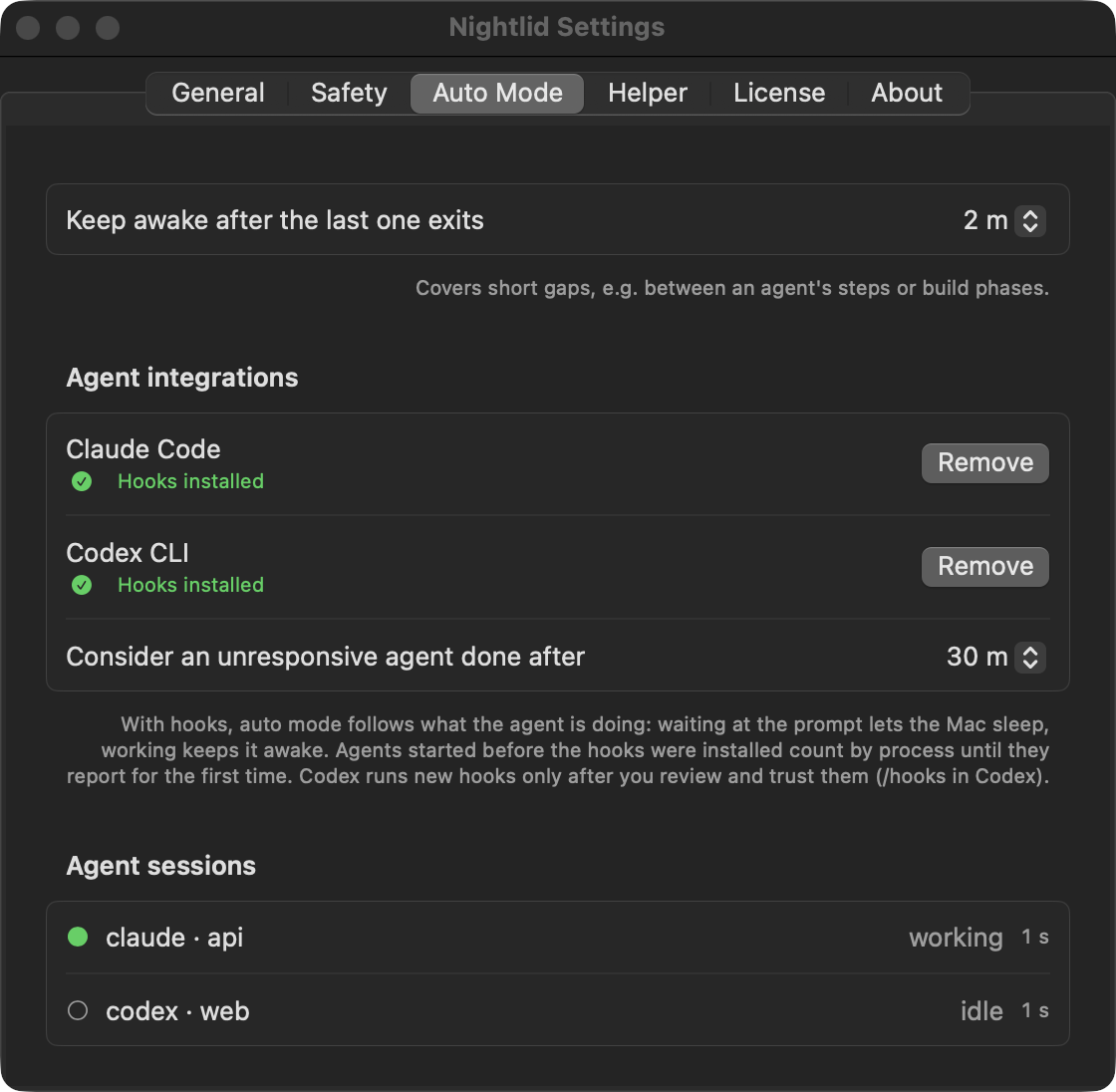
Process detection alone keeps a Mac awake as long as claude sits open at its prompt. Nightlid installs hooks for Claude Code and Codex, so the agent itself reports when a turn starts and ends.
- Prompt submitted → working; every tool call is a heartbeat.
- Turn finished or waiting for your approval → idle; after the grace period the Mac may sleep.
- A crashed agent that goes silent for 30 minutes stops counting.
- The hook exits in milliseconds, never blocks the agent and never writes to its output.
- The installer merges into your existing
settings.json/hooks.json, keeps a backup and refuses files it can’t parse. - Other tools —
aider,gemini,opencode,cargo,docker… — are watched by process name.
# one-time: let your agents report what they’re doing
$ nightlid hooks install claude
$ nightlid hooks install codex

# keep awake exactly while a command runs
$ nightlid run -- swift test

# or by hand
$ nightlid on --for 2h
$ nightlid status --json
Hooks can also be installed from Settings → Auto Mode with one click. Codex asks you to review and trust new hooks (/hooks).
Compare
How Nightlid compares
There are good free options if you work plugged in or with the lid open. Nightlid is for leaving a closed MacBook on battery with an agent running — safely.
| As of October 2026 | Nightlid | Amphetamine+ Amphetamine Enhancer | caffeinatebuilt into macOS | Clamshell | Hold My Lid | LidRun |
|---|---|---|---|---|---|---|
| Lid closed on battery, no display | Yes | YesClosed-Display Mode needs the separately installed Enhancer | Nodoes not reliably survive closing the lid | YesApple Silicon only | Yes | Yesin Pro |
| Battery cut-off | Yes+ helper-enforced emergency floor; puts the Mac to sleep | — | No | Yes | Yes | Yes+ emergency floor |
| Thermal cut-off | Yes | — | No | Yes | — | Yes |
| Reverts if the app crashes | Yes≈ 90 s lease | — | Yesends with the process | — | — | Yes |
| Agent aware | HooksClaude Code, Codex; others by process | App / process triggers | No | — | Hooksfor several agent CLIs | Detectsdev & AI tools |
| Keep awake while a command runs | Yesnightlid run -- | — | Yescaffeinate -i cmd, lid open | — | — | — |
| Only on charger / Low Power Mode stop | Both | — | No | — | Both | — |
| Intel Macs | Yesuniversal | — | Yes | No | — | — |
| Price | $19 once3 Macs, 12 months of updates | FreeMac App Store | Free | $9.991 Mac; $19.99 for 3 | $14.993 Macs | FreePro from $9.90 |
Compiled from each product’s public website and documentation in October 2026. “—” means the feature isn’t advertised or we couldn’t verify it — not necessarily that it’s missing. Prices change; check the vendors’ sites. Spotted a mistake? Tell us and we’ll fix it. Product names are trademarks of their respective owners and are used only to identify those products; Nightlid is not affiliated with or endorsed by them.
Pricing
Pay once. No subscription. Works forever.
Less than $1.60 a month for the first year — and then nothing.
Launch price until Launch price for the first 14 days after release
$19
one-time · per person · up to 3 of your Macs
- A license that works forever
- 12 months of updates included
- Then optional: another year of updates for $9 — the app keeps working either way
- Security fixes for the helper are always free
- 7-day free trial, full features, no card, no account
- 14-day refund, no questions asked
Secure checkout by Polar, our merchant of record; it handles payment, sales tax/VAT and invoices. Prices in USD.
FAQ
Questions
Is it safe?
That’s the point of the app. Keeping a closed Mac awake is one system setting; the risk is leaving it on. Nightlid only keeps the Mac awake while it actively renews a short lease with its helper, ends sessions at your battery floor and on heat, and puts a closed Mac to sleep when the session ends. The helper enforces an emergency battery floor on its own. Details on the security page.
Why does it need a background item or an admin password?
Disabling sleep with the lid closed is a system setting that only an administrator process can change. Nightlid ships a tiny helper that can do exactly that and nothing else: turn the sleep block on or off and put the Mac to sleep. macOS registers it as a background item; you approve it once in System Settings → General → Login Items. No password every time, no edits to sudoers.
The helper only talks to the Nightlid app and its command-line tool, verified by code signature. What the helper can and can’t do.
What happens if Nightlid crashes or I force-quit it?
The helper holds the sleep block only on a 90-second lease that the app renews every 30 seconds. If the app disappears, the lease expires and the helper restores normal sleep — and puts the Mac to sleep if the lid is closed — within about 90 seconds. If the helper itself restarts, it starts with sleep allowed.
What about battery and heat in a bag?
A Mac that works with its lid closed uses as much power as one with the lid open, minus the display. Nightlid stops at your battery floor (20 % by default) and when macOS reports elevated thermal pressure, and then puts the Mac to sleep. Heat warnings and a maximum session length are on by default.
Still: a closed bag traps heat. For long or heavy jobs, prefer a desk or an open bag pocket, or turn on “Only when connected to power”.
Does it really work on battery without an external display?
Yes — that is the case it’s built for. With a display and charger connected, macOS keeps a closed Mac awake by itself (clamshell mode); Nightlid recognises that and doesn’t get in the way.
Apple Silicon or Intel? Which macOS?
Both: Nightlid is a universal app for MacBooks with Apple Silicon and Intel processors. It requires macOS 14 Sonoma or later.
Which agents does it support?
Claude Code and Codex CLI get hooks, so Nightlid follows what they’re doing. Everything else that runs as a process — Cursor’s agent CLI, aider, Gemini CLI, opencode, goose, builds, Docker — can be watched by name, and you can add your own. Agents embedded in editors (VS Code, Cursor, Windsurf extensions) and long-running servers are deliberately ignored, because they would never let the Mac sleep.
How do I uninstall it?
- Settings → Helper → Uninstall Helper… removes the helper and its background item.
- Settings → Auto Mode → remove the agent hooks (or
nightlid hooks uninstall). Only Nightlid’s entries are removed; a backup of your original file is kept. - Quit Nightlid and move it to the Trash. Optionally delete
~/Library/Application Support/Nightlidand the~/.local/bin/nightlidlink.
Nothing is left changed on your Mac: the helper resets the sleep setting when it stops.
How does the trial work?
Download and use every feature for 7 days. No card, no account, no email. When it ends, buy a license to keep using Nightlid; your Mac simply goes back to normal sleep behaviour.
Can I get a refund?
Yes. Within 14 days of purchase, for any reason — just ask. See the refund policy.
What happens after the 12 months of updates?
Nightlid keeps working — forever — on the last version released during your update period. If you want newer versions, renew updates for $9 for another 12 months, whenever you like. Security fixes for the helper are free regardless.
Does Nightlid collect any data?
No analytics, no tracking. The app talks to the internet only to check for updates and to validate your license. Privacy policy.
Close the lid. Go home.
Your agent keeps working. Your Mac sleeps when it’s done.